potree-core
Potree Core 2.0


- This project was originally based on Potree Viewer 1.6 and is now since version 2.0 based on the shiukaheng fork of the Potree-Loader.
- Potree is a web based pouint cloud visualizer project created by Markus Schütz.
- This project contains only the main parts of the potree project adapted to be more easily used as a independent library, the code was adapted from the original repositorys.
- Support for pointclouds from LAS, LAZ, Binary files.
- Some features require support for the following GL extensions
- EXT_frag_depth, WEBGL_depth_texture, OES_vertex_array_object
Demo
- Live demo at https://tentone.github.io/potree-core/
- Double click the models to raycast the scene and create marker points.
- See the interactive example source and build configuration.
- Run
npm install, thennpm startto open the development demo at http://localhost:5200. - Run
npm run build:examplefrom the repository root to build the example intobuild/, includingindex.html, the bundled code, and point-cloud data. Serve that directory over HTTP at the server root with support for byte-range requests. - The Points panel controls point size, shape (
PointShape), opacity type (PointOpacityType), and color type (PointColorType).
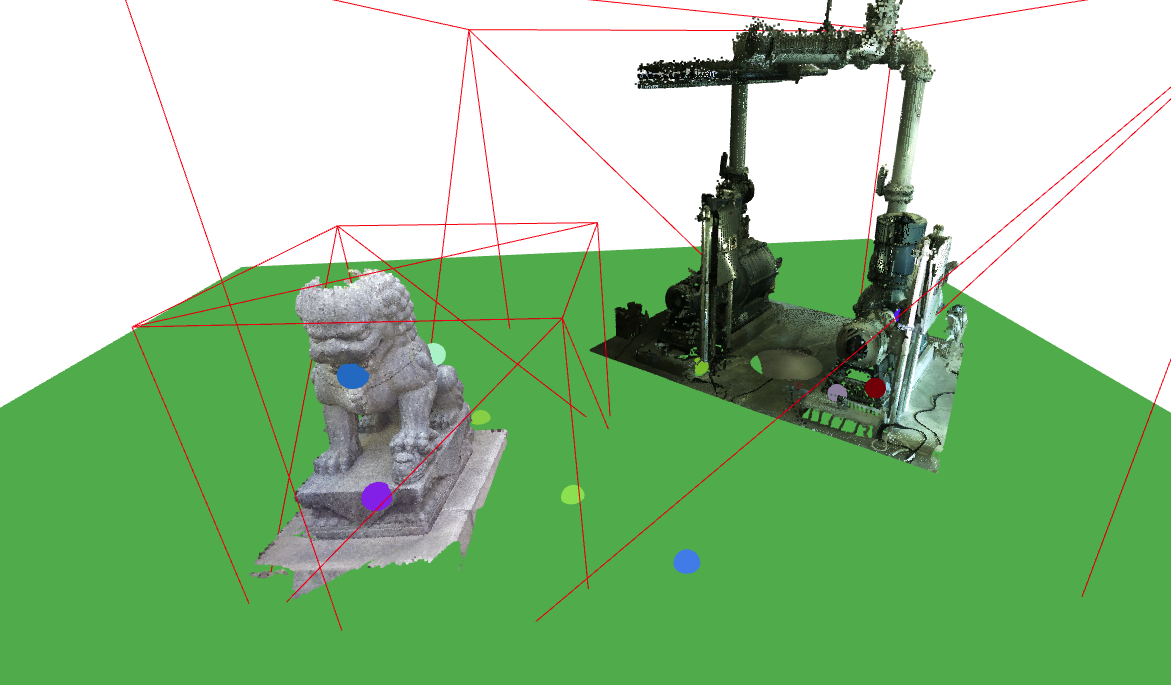
Example
- The project can be build running the commands
npm installandnpm run build. - Download the potree build from the build folder or add it to your project using NPM.
- Include it alonside the worker folder in your project (can be found on the source folder).
- The build is a ES module, that can be imported to other projects, threejs should be available as a peer dependency.
- Bellow its a fully functional example of how to use this wrapper to load potree point clouds to a three.js project
const scene = new Scene();
const camera = new PerspectiveCamera(60, 1, 0.1, 10000);

const canvas = document.getElementById("canvas");

const renderer = new WebGLRenderer({canvas:canvas});

const geometry = new BoxGeometry(1, 1, 1);
const material = new MeshBasicMaterial({color: 0x00ff00});
const cube = new Mesh(geometry, material);
scene.add(cube);

const controls = new OrbitControls(camera, canvas);
camera.position.z = 10;

const pointClouds = [];

const baseUrl = "data/test/";
const potree = new Potree();
potree.loadPointCloud("cloud.js", baseUrl).then(function(pco) {
   scene.add(pco);
	pointClouds.push(pco);
});

function loop()
{
   potree.updatePointClouds(pointClouds, camera, renderer);

	controls.update();
	renderer.render(scene, camera);

	requestAnimationFrame(loop);
};
loop();
Closed point surfaces
PointShape.CLOSED reconstructs small gaps between points with screen-space binary closing. Use PotreeRenderer to run its multiple passes:
import { PointShape, PotreeRenderer } from 'potree-core';

pco.material.shape = PointShape.CLOSED;
const pointRenderer = new PotreeRenderer({
	closed: { radius: 2, depthThreshold: 0.02 },
	edl: { enabled: false },
});

// Each animation frame:
pointRenderer.updateAndRender(potree, pointClouds, camera, renderer, scene);

// Change settings at runtime:
pointRenderer.setClosed({ radius: 3 });

// When finished (clouds and the three.js renderer remain caller-owned):
pointRenderer.dispose();
- Each cloud first renders depth-tested one-physical-pixel samples, independently of point size, size type, min/max size, highlight scale, and device pixel ratio. Calling
renderer.render()directly displays only these samples; closing requiresPotreeRenderer. - A square kernel dilates the binary occupancy mask, then erodes it with the same kernel.
radiusdefaults to 2 physical pixels, rounds to an integer, and clamps to 1–4. Larger radii fill larger gaps and cost more GPU time. Viewport padding preserves samples at image boundaries. - Original samples keep their attributes. New pixels interpolate color, opacity, positive view-space depth, and view-space normals with inverse squared pixel-distance weights. Only samples within
depthThresholdof the closest depth contribute; the default 0.02 means 2% of that depth. The tolerance is nonnegative and does not change the binary mask. Separate clouds never interpolate together. - Normals are transformed with the normal matrix and renormalized after interpolation.
PointColorType.NORMALdisplays them as view-space RGB (normal * 0.5 + 0.5). If a cloud lacks normals, this mode estimates them from neighbouring reconstructed depths, falling back to a camera-facing normal for isolated points. - Reconstructed pixels obey clipping and write interpolated depth, so ordinary meshes can occlude the surface. Perspective, orthographic, logarithmic depth, render targets, and optional EDL are supported. EDL is evaluated separately for each reconstructed cloud.
- This is a view-dependent surface approximation: large gaps remain open, and overlapping depth layers can still produce artifacts. Transparency composites the nearest surface with normal alpha blending; weighted splatting is bypassed. Picking continues to return original points, not synthetic surface pixels.
- Requires WebGL2 and
EXT_color_buffer_float; an unsupported context throws an explicit error. Four RGBA32F attribute textures, an R8 mask, and a depth buffer are reused between clouds (roughly 137 MiB at 1920×1080, plus padding and any EDL target). Release them withPotreeRenderer.dispose().
Select Closed in the demo’s Points → Shape control. Closing Radius (px) and Closing Depth Tolerance adjust reconstruction.
Run npm run build followed by node tests/run-browser-checks.mjs for the Chromium GPU regression checks. Set BROWSER_PATH if Chromium is installed outside the detected paths. The checks compare the GPU mask against a binary morphology reference, exercise interpolation, depth, clipping and renderer state, and load both bundled cloud formats. Preview images and results are written to build/browser-checks/. To also exercise the demo, first run npm run build:example, then set CHECK_DEMO=1 when running the checks.
Clip Boxes
- Clip boxes restrict the rendered region of a point cloud to a box-shaped volume.
- Use
createClipBox(size, position, mode?)to build anIClipBox. mode?: "include" | "exclude".include: clip-outside semantics for that volume (inside can stay visible).exclude: clip-inside semantics for that volume (inside is removed).- If
modeisundefined, that volume inherits the global materialclipMode. ClipMode.DISABLEDis a global master off switch and disables all clipping/highlighting.- Clipping uses one unified rule across boxes, spheres, and clip planes:
- include volumes are unioned
- exclude volumes are unioned
B = (!hasIncludeVolumes || insideAnyInclude) && !insideAnyExcludeP = insideAllPlanesS = hasBoxOrSphere- For
CLIP_OUTSIDE:visible = B && P - For
CLIP_INSIDE:visible = (S && B) || !P
- Global
ClipMode.HIGHLIGHT_INSIDEis still supported through inheritance (modeundefined) and only highlights without changing visibility. - Clip planes are evaluated as
insideAllPlanes(point is on the positive side of all planes). - Planes are integrated into the same formulas via
P, so plane-only behavior falls out naturally from the same equations.
import { ClipMode, createClipBox } from 'potree-core';
import { Vector3 } from 'three';

pco.material.clipMode = ClipMode.CLIP_OUTSIDE; // global fallback for undefined volume modes

const includeA = createClipBox(new Vector3(10, 10, 10), new Vector3(0, 0, 0), 'include');
const excludeB = createClipBox(new Vector3(4, 4, 4), new Vector3(0, 0, 0), 'exclude');
const inheritedD = createClipBox(new Vector3(3, 3, 3), new Vector3(-3, 0, 0)); // inherits CLIP_OUTSIDE

pco.material.setClipBoxes([includeA, excludeB, inheritedD]);
Clip Spheres
- Clip spheres work like clip boxes and support the same optional mode.
- Use
createClipSphere(center, radius, mode?)to build anIClipSphere. mode?: "include" | "exclude".- If
modeisundefined, the sphere inherits the global materialclipMode.
Clip Planes
- Clip planes do not have per-plane mode; they always use inherited global mode behavior.
- Planes are represented by
P = insideAllPlanesin the visibility formulas above.
import { ClipMode, createClipSphere } from 'potree-core';
import { Vector3 } from 'three';

pco.material.clipMode = ClipMode.HIGHLIGHT_INSIDE;

const sphereA = createClipSphere(new Vector3(0, 1, 0), 3, 'exclude');
const sphereB = createClipSphere(new Vector3(5, 1, 0), 2); // inherits HIGHLIGHT_INSIDE

pco.material.setClipSpheres([sphereA, sphereB]);
Custom Request Manager
- The potree core library uses a custom request manager to handle the loading of point cloud data.
- The request manager can be replaced by a custom implementation, for example to use a custom caching system or to handle requests in a different way.
   class CustomRequestManager implements RequestManager
   {
      fetch(input: RequestInfo | URL, init?: RequestInit): Promise<Response> {
         throw new Error("Method not implemented.")
      }

      async getUrl(url: string): Promise<string> {
         return url;
      }
   }
Notes
- Since potree-core is meant to be used as library and not as a full software as potree some features are not available.
- EDL shading is available through
PotreeRendererwithedl: {enabled: true}, seeexample/main.ts. - Removed Arena 4D point cloud support.
- Removed Entwine Point Tile file support.
- GUI elements were removed from the library
- PotreeViewer
- Controls, Input, GUI, Tools
- Anotations, Actions, ProfileRequest
- Potree.startQuery, Potree.endQuery and Potree.resolveQueries
- Potree.timerQueries
- Potree.MOUSE, Potree.CameraMode
- RepRenderer, Potree.Renderer
- JQuery, TWEEN and Proj4 dependencies
Potree Converter
- Use the (Potree Converter)[https://github.com/potree/PotreeConverter/releases] tool to create point cloud data from LAS, ZLAS or BIN point cloud files
- Potree Converter 1.8 creates a multi file structure with each node as an individual file.
- Potree Converter 2.1 creates a single file for all points and separates files for hierarchy index, its faster to create files. Requires a HTTP server configured for file streaming.
- Tool to create hierarquical structure used for point-cloud rendering using potree-core.
- There are two main versions 2.1 witch generates 4 contained files with point data, hierarchy,
- To generate a folder output from a input file run the command
.\PotreeConverter '..\input.laz' -o ../output
TXT2LAS
- The potree converter tool only supports las and laz files, so textural file formats such as .pts, .xyz, have to be first converted into a supported format.
- The TXT2LAS tool from the (LASTools)[https://github.com/LAStools/LAStools] repository can be used for this effect.
- To run the tool use the command
.\txt2las64 -i input.pts -ipts -parse xyziRGB -set_scale 0.001 0.001 0.001 -set_version 1.4 -o output.laz
### To Do
- Supports logarithmic depth buffer (just by enabling it on the threejs renderer), useful for large scale visualization.
- Point clouds are automatically updated, frustum culling is used to avoid unnecessary updates (better update performance for multiple point clouds).